


Statesman Journal
3.175.00 Reviews
App Specs
- Version
- 8.10.3
- Updated On
- License
- Free
- Downloads
- 10,000+
- Developer
- USA TODAY Co.
- Categories
- News & Magazines
- Platform
- Android
Screenshots







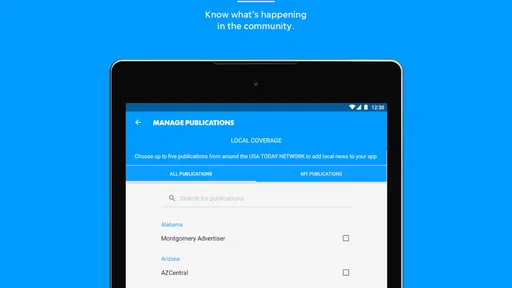
 Analysis by AppCompare
I find a local news app most useful when it helps me understand what is happening nearby without making me work to get to the story. The Statesman Journal is aimed at that kind of reading: local coverage sits alongside state and national news, with photography and video adding other ways to follow a report. It is a free news app from USA TODAY Co., but in-app purchases are available, so I would check the purchase details before relying on it as a completely cost-free reading option.
Reading and finding your way around
Jumping into the Statesman Journal app, the first thing I noticed was how clean and intuitive the interface felt. It's like stepping into a well-organized library, where everything is just a tap away. The layout is uncluttered, which is a big plus in my book. I mean, who wants to navigate through a maze just to find a top story?
The home screen greets you with the most recent headlines, and there's a handy navigation bar at the bottom that lets you switch between sections like news, sports, and opinion pieces. It’s super user-friendly, even for those who aren’t tech-savvy.
That straightforward layout matters most when I have a specific purpose: checking a local headline before work, looking for context after hearing a story from a neighbor, or browsing more casually when I have a few minutes. I would use the front page for a quick scan, then move into a section only when I want to spend longer on a subject. This small habit helps keep a news session focused instead of turning into an endless scroll.
The app is best suited to readers who want Salem-area reporting in the same place as wider news. If I mainly wanted international coverage, specialized business reporting, or a broad mix of publishers, I would choose a larger multi-source news reader instead. A local publication can offer a more relevant view of nearby issues, but it naturally cannot replace every other kind of news source.
Content and useful reading habits
Now, content is king, right? The app delivers a broad range of topics, from local news in Salem, Oregon, to broader state and national news. I found the coverage to be pretty comprehensive. It’s like having a mini newspaper in your pocket, minus the ink stains.
One feature I particularly enjoyed is the customizable news alerts. You can set these up for specific topics or breaking news, so you’re always in the loop. It’s perfect for someone like me who hates missing out on the latest scoop.
Worth Reading Before You Choose

Flipboard Shows What News Apps Must Do Beyond the Feed

Switching to Android Auto Means Rethinking Your Driving Routine

Google Calendar Makes a Crowded Week Easier to Manage

Ludo King Makes the Most of the Minutes Between Plans

Baby Panda World Brings Quick Play to Modern Phones, but Its Game Library Feels Busy

ESPN’s Live Game View Makes Following Close Games Easier
Alerts are most helpful when I treat them as a filter rather than a running commentary. I would choose only subjects I genuinely need to follow, then let the app’s sections handle the rest when I open it. That is a practical way to avoid having every update interrupt work, a conversation, or a quiet moment. Readers who prefer to discover stories only when they choose may be happier leaving alerts off and checking the headlines on their own schedule.
There’s also a section for videos, which adds a nice touch. Sometimes it’s just easier to catch up on news via a quick video rather than reading through a lengthy article. The app seems to understand this balancing act well.
Video is a useful alternative when my hands are occupied or I want a quick overview, but it is not automatically the better format. In a quiet place, reading lets me move at my own pace and revisit a detail; in a noisy room, video may be less convenient unless I can listen comfortably. I would switch between formats based on the situation instead of expecting every story to work equally well as text and video.
Performance, controls, and different needs
In terms of performance, the app runs smoothly. I didn’t experience any lag or crashes during my time using it, which is always a relief. Whether I was on Wi-Fi or mobile data, the articles loaded swiftly. It seems like they’ve optimized it well for both Android and iOS users.
The search function is also noteworthy. It’s precise and quick, allowing you to find specific articles or topics without any hassle. I’ve tried a few other news apps where the search feature felt like a wild goose chase, but not here.
For a useful search workflow, I would start with a distinctive name or phrase rather than a broad subject. That makes it easier to find a particular report when I remember only one detail from it. Search is also a good route back to a story after an alert has prompted me to read it; instead of scanning every section again, I can look for the key term. Readers who follow a topic over time should still browse its section now and then, since a search for one phrase may not surface every related angle.
Clear sections and a familiar bottom navigation can reduce the effort of moving around, especially for someone who does not want to learn a complicated interface. Still, a clean layout is not the same thing as a guarantee that every screen will suit every reader. People who need larger text, strong contrast, screen-reader support, captions, or other specific accommodations should test those tasks on their own device before making this their main source. I would pay particular attention to whether article text is comfortable for a longer session and whether video works for my hearing and viewing needs.
There is also a motor and sensory trade-off in any phone-based news routine. Tapping a section or search result can be convenient, but reading on a small screen may require repeated scrolling and precise touches. If that becomes tiring, I would keep sessions short, use the section navigation to avoid unnecessary browsing, and open the print-style edition only if its page layout feels easier to follow. That replica may suit readers who prefer a newspaper-like rhythm, while the regular article view is likely more practical for quickly checking a single story.
Local connection and the print-style option
Another cool thing about the app is the inclusion of opinion pieces and community stories. It gives a sense of connection to the local community, which I genuinely appreciate. It’s not just about hard news; there’s a personal touch that makes the app feel like a community hub.
The app also offers a digital replica of the print edition, which is perfect for traditionalists who love the feel of a newspaper layout. You can flip through pages just like you would with a physical newspaper, which is quite nostalgic.
I see the replica as a different reading mode, not simply a duplicate of the regular feed. If I want to browse an edition in its newspaper order, the page format gives me that familiar overview; if I am checking one report quickly, opening the article directly is a more efficient choice. A simple routine is to use the main feed for breaking or targeted reading and save the replica for a calmer moment when browsing the whole edition is part of the appeal.
That distinction also helps answer whether this app should replace other news sources. For someone in or interested in the Salem community, local reporting and community-focused pieces are the reason to keep it nearby. For someone who wants one feed to compare coverage from many outlets, a general news aggregator is a better fit. I would use the Statesman Journal for its local lens and keep another source for subjects it does not aim to cover in depth.
Practical trade-offs before choosing it
Statesman Journal is free to download, and the app is rated for Everyone 10+. Its average rating is 3.1 from 166 ratings, with 75 written reviews, and it has over 10,000 installs. Those figures suggest a modest audience and mixed impressions rather than a universal favorite, so I would treat my own needs as the deciding factor. The app’s current version is 8.7.1, it requires iOS or Android 8.0 or later, and optional in-app purchases range from $14.99 to $69.99 per item.
For a typical weekday, I can picture opening the app over breakfast, scanning local headlines, and saving a longer read for a break. If a topic matters to me, I can use an alert to notice a new development; later, search can help me return to a report, while video offers another way to catch up when reading is inconvenient. That routine makes the app useful without requiring me to keep it open all day.
The main friction is that a free download does not necessarily mean every reading option will be free. Before committing to a digital-edition habit or making a purchase, I would check what the chosen option includes and whether it fits how often I read. People who only want occasional headlines may not need to pay for anything, while frequent readers should decide whether the paid option is worthwhile for them rather than assuming all content works the same way.
Compatibility is another practical check. The minimum operating-system requirement is 8.0, so I would confirm that an older phone can run the app before planning to rely on it. On a device that struggles with news apps or has limited screen space, a mobile browser may be a simpler fallback for an occasional article; the app makes more sense when I want its sections, alerts, search, and newspaper-style browsing in one place.
Who will get the most from it
In conclusion, the Statesman Journal app is a solid choice for anyone looking to stay updated with local and national news. It’s user-friendly, packed with content, and performs reliably. While it might not replace your Sunday paper entirely, it’s a fantastic companion for news on the go.
If you’re someone who values staying informed without the fuss, I’d say give this app a shot. It’s like carrying a slice of Salem’s vibrant community in your pocket, ready to keep you informed and engaged with just a tap.
I would recommend it most to people who want a dependable starting point for Salem-area news and appreciate having articles, video, opinion, and a print-style edition together. It is less compelling for readers who need a single, comprehensive national feed, prefer to avoid optional purchases entirely, or depend on accessibility settings that they have not yet tested with the app. My advice is to try the everyday tasks that matter to you first: scan the front page, find a local story, adjust your alert habits, and see whether the text and video formats feel comfortable.
That practical check is more useful than judging it by a star score alone. A local publication has a particular job: helping readers stay connected to the place they live or follow. When that is what I need, the Statesman Journal’s mix of local focus and familiar news formats earns a place on my phone; when I need broader source variety or a reading experience tailored to specific access needs, I would pair it with another option rather than expect one app to do everything.
Pros
- User-friendly interface for easy navigation.
- Comprehensive coverage of local news.
- Customizable notifications for updates.
- Fast-loading articles with minimal ads.
- Offline reading mode available.
Cons
- Limited international news coverage.
- Subscription required for full access.
- Occasional app crashes reported.
- Some users find video autoplay intrusive.
- Limited personalization options.
FAQs for Statesman Journal
What is the main purpose of the Statesman Journal app?
The Statesman Journal app provides users with up-to-date news and information from local to international levels. It offers real-time updates, breaking news alerts, and in-depth coverage on a variety of topics such as politics, sports, entertainment, and community events. The app is designed to keep you informed on the go.
Is the Statesman Journal app free to use?
The Statesman Journal app is free to download and offers some content at no cost. However, to access premium articles and exclusive features, a subscription may be required. Subscription plans can vary, providing options for monthly or annual billing, ensuring users can choose what best fits their needs and budget.
What features does the Statesman Journal app offer?
The app includes features such as personalized news feeds, push notifications for breaking news, and options to save articles for offline reading. Users can also access multimedia content including videos and photo galleries. The app's user-friendly interface makes navigation simple, enhancing the overall reading experience.
How does the Statesman Journal app handle user data and privacy?
The Statesman Journal app is committed to protecting user privacy. It collects minimal data necessary for functionality, and any information gathered is handled in compliance with privacy regulations. Users can adjust privacy settings within the app and are encouraged to review the app's privacy policy for detailed information.
Can I customize my news feed on the Statesman Journal app?
Yes, the app allows you to customize your news feed by selecting preferred topics or sections. This personalization feature ensures that you receive updates and articles that align with your interests, making it easier to stay informed about the subjects that matter most to you.


